
Cocos Creator Component -- Countdown Timer
A downloadable Cocos Component for Windows
📌 Introduction
CountdownTimer is a highly customizable countdown timer component for Cocos Creator 3.x. It allows you to easily add countdown functionality to your game with features like warning color transitions, end-of-timer animations, and customizable prefix/suffix text. Whether you need a level timer, challenge mode countdown, or UI timer, CountdownTimer integrates quickly into your project.
Key Features:
- Automatic or manual countdown start
- Customizable prefix and suffix text
- Warning state color (instant or smooth transition)
- End-of-timer text animations (fade, scale, or none)
- Simple event callback (
countdown-finished)
----------------------------------------------------------------------------------------------------------
🎮 Supported Effects
CountdownTimer supports the following effects and features:
1. Time Formatting
- Automatically formats seconds into
HH:MM:SSorMM:SS; under 60 seconds shows seconds only - Auto-padding with zeros for consistent display
2. Warning State
- Triggered when the countdown reaches
warningTime - Color modes:
- Instant: changes to warning color immediately
- Smooth: smoothly transitions to warning color
- Supports custom warning prefix and suffix text
3. End-of-Countdown
- Displays a customizable
endText - Three animation modes:
- None: instant display
- Fade: fade out and in animation
- Scale: shrink and grow animation
4. Tween Integration
- Uses Cocos Creator's Tween system for animations
- Automatically stops any ongoing tweens to prevent conflicts
----------------------------------------------------------------------------------------------------------
✅ Installation
- Download the CountdownTimer component (
CountdownTimer.ts). - Place the file in your Cocos Creator project under
assets/scripts. - Attach the CountdownTimer component to the node containing a Label.
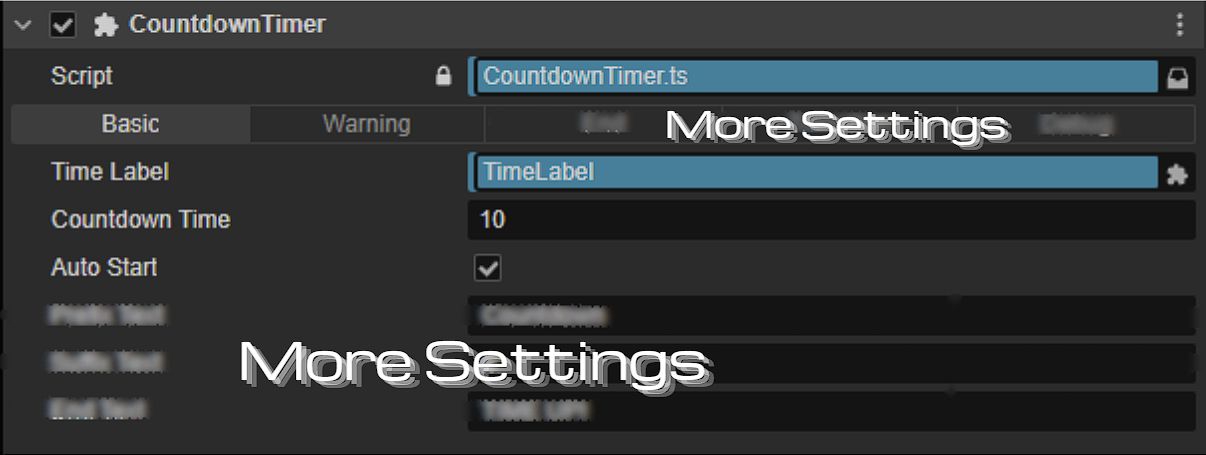
- Configure the Label, countdown time, and other options in the Inspector panel.
----------------------------------------------------------------------------------------------------------
🛠️How to Use?
- Set
autoStarttotrueand the countdown begins when the scene loads.
2. Manual Start
const countdown = this.node.getComponent(CountdownTimer);
countdown.startCountdown();
3. Listen for Countdown Finished Event
this.node.on("countdown-finished", () => {
    console.log("Countdown finished!");
});
- Configure
prefixText,suffixText,warningPrefixText, andwarningSuffixText - Set
colorNormalandcolorWarning
‼️ Warning State
When the countdown reaches warningTime, the component enters a warning state:
- Supports different prefix and suffix text for the warning state
- Smooth mode: gradually transitions color over the warning period
- Instant mode: switches color immediately
suffix: "s left"
---------------------------------------------------------------------------------------------------------
🎞️ Test Scene
To quickly test CountdownTimer:
- Create a Canvas in your scene.
- Add a Label node and set its text to
00:00. - Attach CountdownTimer to the Label node.
- Set properties:
-
countdownTime: 10 -
warningTime: 3 -
colorMode: Instant or Smooth -
endTransition: Fade or Scal
-
- Press Play to observe the countdown effect.
----------------------------------------------------------------------------------------------------------
⚠ Notes
- This component is based on Cocos Creator 3.x
- Tween Conflicts: Warning state automatically stops any existing Tween animations to prevent overlap.
- Time Updates: Countdown updates every second; smooth warning color transitions do not affect prefix text.
- Custom Text: Supports prefix, suffix, and end-of-timer text for versatile UI use.
- Event Callback:
countdown-finishedcan trigger scene changes, sound effects, or other game logic.
----------------------------------------------------------------------------------------------------------
❓ FAQ
Q: Can I pause the countdown? A: Yes. Set countdown.paused = true to pause and paused = false to resume.
Q: How does the smooth warning color work? A: Set colorMode to Smooth. The transition duration is determined by warningTime.
Q: How do I customize the end-of-countdown animation? A: Use endTransition to select None, Fade, or Scale. Adjust transitionDuration for animation speed.
If you have any questions, feel free to leave me a message on my Discord website!
📩 Contact:
Discord: KEN LOO
(Add me as a friend to message)
----------------------------------------------------------------------------------------------------------
📄 License
- Allowed for use by individuals and commercial projects
- Resale or redistribution of the source code is not permitted.
----------------------------------------------------------------------------------------------------------
❤️ Support
If you encounter any problems while using it, feel free to leave a comment below. Thank you for using Countdown Timer! More updates are coming soon!
Purchase
In order to download this Cocos Component you must purchase it at or above the minimum price of $0.65 USD. You will get access to the following files:
Leave a comment
Log in with itch.io to leave a comment.