
Cocos Creator Component -- Floating Effect
A downloadable Cocos Component for Windows
📌 Introduction
FloatingEffect is a lightweight, professional Cocos Creator component that allows any object to float naturally in your scene. It supports smooth motion, rotation, and randomization for multiple objects, giving your game a polished, dynamic feel. Ideal for coins, collectibles, magic items, energy cores, and more
----------------------------------------------------------------------------------------------------------
🎮 Supported Effects
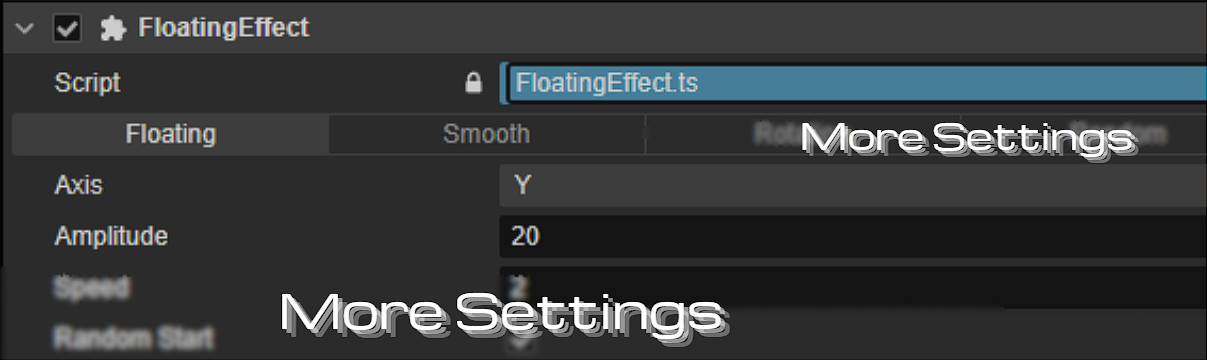
- Floating - Move object along X ,Y or Z axis.
- Smooth Motion - Soft, organic floating with adjustable smooth speed.
- And More Settings
----------------------------------------------------------------------------------------------------------
✅ Installation
- Copy
FloatingEffect.tsinto your Cocos Creator project folder.
- Open your scene in Cocos Creator.
- Select the Node you want to apply the effect to.
- Click Add Component → Scripts → FloatingEffect.
----------------------------------------------------------------------------------------------------------
🛠️How to Use?
- Floating Group - Set Axis (X/Y/Z), Amplitude, Speed, and optionally Random Start.
- Smooth Group - Enable Smooth Motion and set Smooth Speed for softer movement.
- And More Settings
----------------------------------------------------------------------------------------------------------
🔄️ Rotation Float
- Enables your objects to rotate while floating.
- Rotation speed is adjustable.
- Works together with Smooth Motion and Randomize.
----------------------------------------------------------------------------------------------------------
🎞️ Test Scene
This resource contains a test scenario:
- Demonstrating all floating effects
- You can run it directly to see the effect.
- New users are advised to check out the Test Scene first.
----------------------------------------------------------------------------------------------------------
⚠ Notes
- This component is based on Cocos Creator 3.x
- Randomize ensures multiple objects do not move in sync.
- Smooth Motion creates more natural, soft movement; disable if instant floating is desired.
- Rotation Float only rotates along the Y-axis (can be adjusted in future updates).
- Editor Preview allows you to see the effect without running the game.
----------------------------------------------------------------------------------------------------------
❓ FAQ
Q: Can I apply FloatingEffect to multiple objects at once? A: Yes, simply add the component to each object. Randomize ensures they float independently.
Q: Can I float along multiple axes at the same time? A: Currently, FloatingEffect supports only one axis at a time. Multi-axis support may come in a future update.
Q: Will enabling Smooth Motion affect rotation? A: No, Smooth Motion only smooths the positional movement. Rotation Float works independently.
If you have any questions, feel free to leave me a message on my Discord website!
📩 Contact:
Discord: KEN LOO
(Add me as a friend to message)
----------------------------------------------------------------------------------------------------------
📄 License
- Allowed for use by individuals and commercial projects
- Resale or redistribution of the source code is not permitted.
----------------------------------------------------------------------------------------------------------
❤️ Support
If you encounter any problems while using it, feel free to leave a comment below. Thank you for using Floating Effect! More updates are coming soon!
Purchase
In order to download this Cocos Component you must purchase it at or above the minimum price of $0.65 USD. You will get access to the following files:
Leave a comment
Log in with itch.io to leave a comment.